StarTech.com · 2026 · open_icecat
StarTech.com Thunderbolt 5 Dock, 4 Displays, 140W PD
Thunderbolt 5 docking station with 140 W power passthrough, four external display support, 2.5 Gb Ethernet and an 80 Gbps data rate.
Editorial Verdict“A Thunderbolt 5 desk dock built around four displays, 140 W charging and 2.5 Gb Ethernet.”
Key Findings & Trade-offs
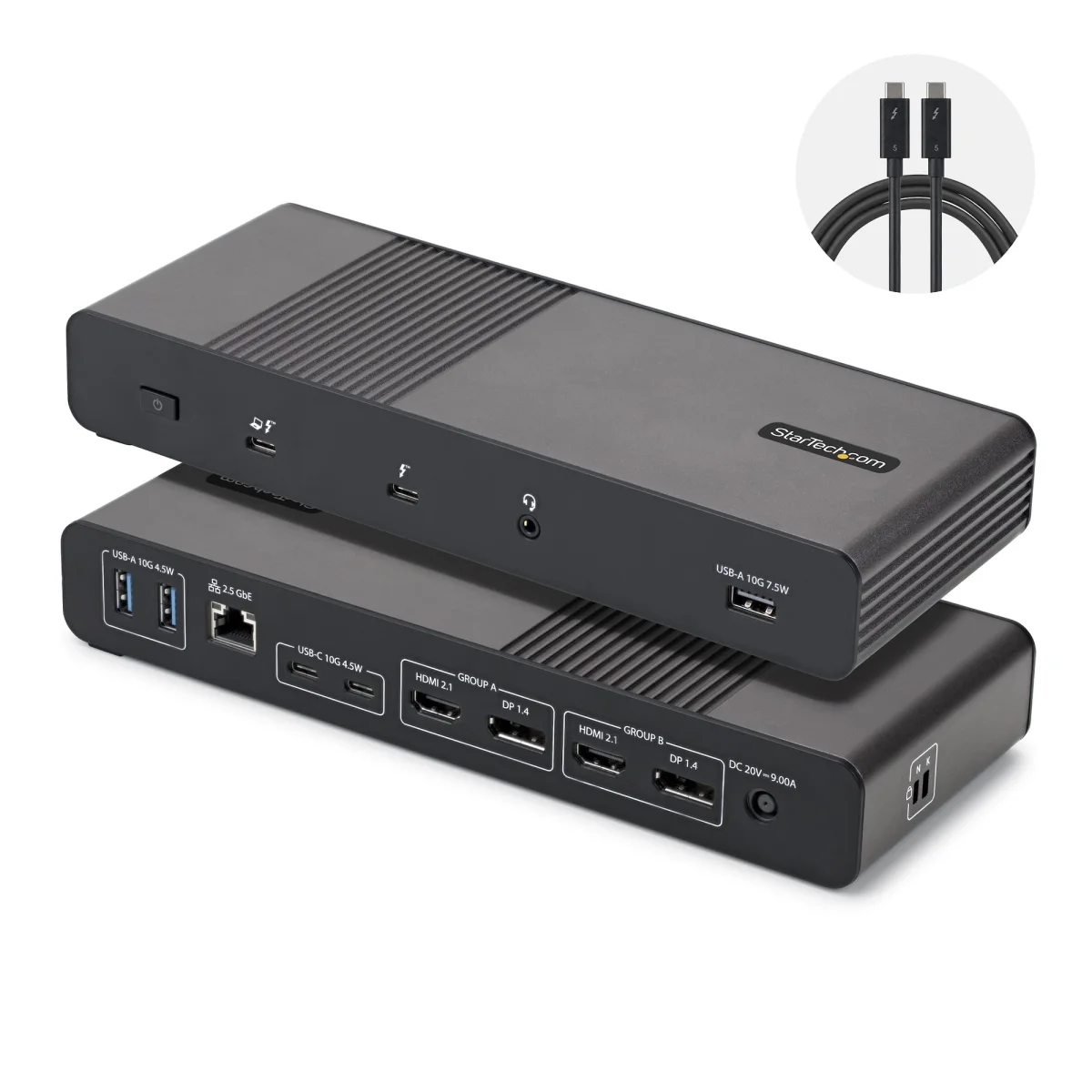
One Thunderbolt 5 connection to the host fans out to 2 HDMI 2.1, 2 DisplayPort 1.4, 3 USB-C, 3 USB-A, a 3.5 mm port and 2.5 Gb Ethernet, with up to 140 W of power passthrough for the laptop.
Four displays is the headline, but 3840 x 2160 and 240 Hz are peak values, so check your screen mix before planning around them. At 0.73 kg it is a desk dock, not a bag companion.
2 HDMI 2.1 and 2 DisplayPort 1.4 outputs support up to four external displays, so a four-screen desk can run from a single host connection.
The dock passes up to 140 W to the connected laptop, enough to keep a high-wattage Thunderbolt 5 machine charged through the same cable.
The data rate is 80 Gbps, and the product name cites a 120 Gbps Bandwidth Boost, which matters most when several high-refresh displays share the link.
3 USB-C, 3 USB-A and wired Ethernet at up to 2500 Mbit/s cover storage, peripherals and a fast LAN without extra adapters.
- Owners of a Thunderbolt 5 laptop who want a four-monitor desk driven from one cable.
- Desks that need wired 2.5 Gb Ethernet plus several USB-C and USB-A ports alongside laptop charging.
- Mixed Mac and Windows setups where one dock has to serve both.
- Your laptop does not have a Thunderbolt 5 port, since that is the dock's host interface.
- You want something to carry daily; at 0.73 kg it is better left on the desk.
- You only run one or two displays and do not need this many outputs.
Compatibility Notes
Well-Matched Laptops
Matched on verified wattage & port specs


Where to Check Availability
Direct merchant link (no redirect). Editorial specs are never influenced by availability.Verified Technical Specifications
- Wired Ethernet
- Yes
- USB-C Power Delivery
- Yes
- Weight
- 0.73 kg
- HDMI ports
- 2
- Refresh rate
- 240 Hz
- USB-A ports
- 3
- USB-C ports
- 3
- HDMI version
- 2.1
- Data rate
- 80 Gbps
- Host interface
- Thunderbolt 5
- max resolution
- 3840 x 2160
- Host PD passthrough
- 140 W
- DisplayPort outputs
- 2
- Thunderbolt ports
- 1
- DisplayPort version
- 1.4
- Thunderbolt version
- 5
- Max external displays
- 4
Verified Configurations & Identifiers (1)
Frequently Asked Questions
How many monitors can the StarTech.com 206UE-TB5USB4DOCK drive?
It supports up to four external displays through 2 HDMI 2.1 and 2 DisplayPort 1.4 outputs. Maximum resolution is 3840 x 2160 and maximum refresh rate is 240 Hz.
How much power can this dock deliver to a laptop?
It offers up to 140 W of USB-C power delivery passthrough to the connected laptop.
Does it have fast Ethernet?
Yes. The wired Ethernet port runs at 10, 100, 1000 and 2500 Mbit/s, so it reaches 2.5 Gb speeds.