Lenovo · 2025 · energystar_v9, open_icecat
Lenovo ThinkPad P14s Gen 6 (Intel): RTX PRO 500, 96 GB RAM
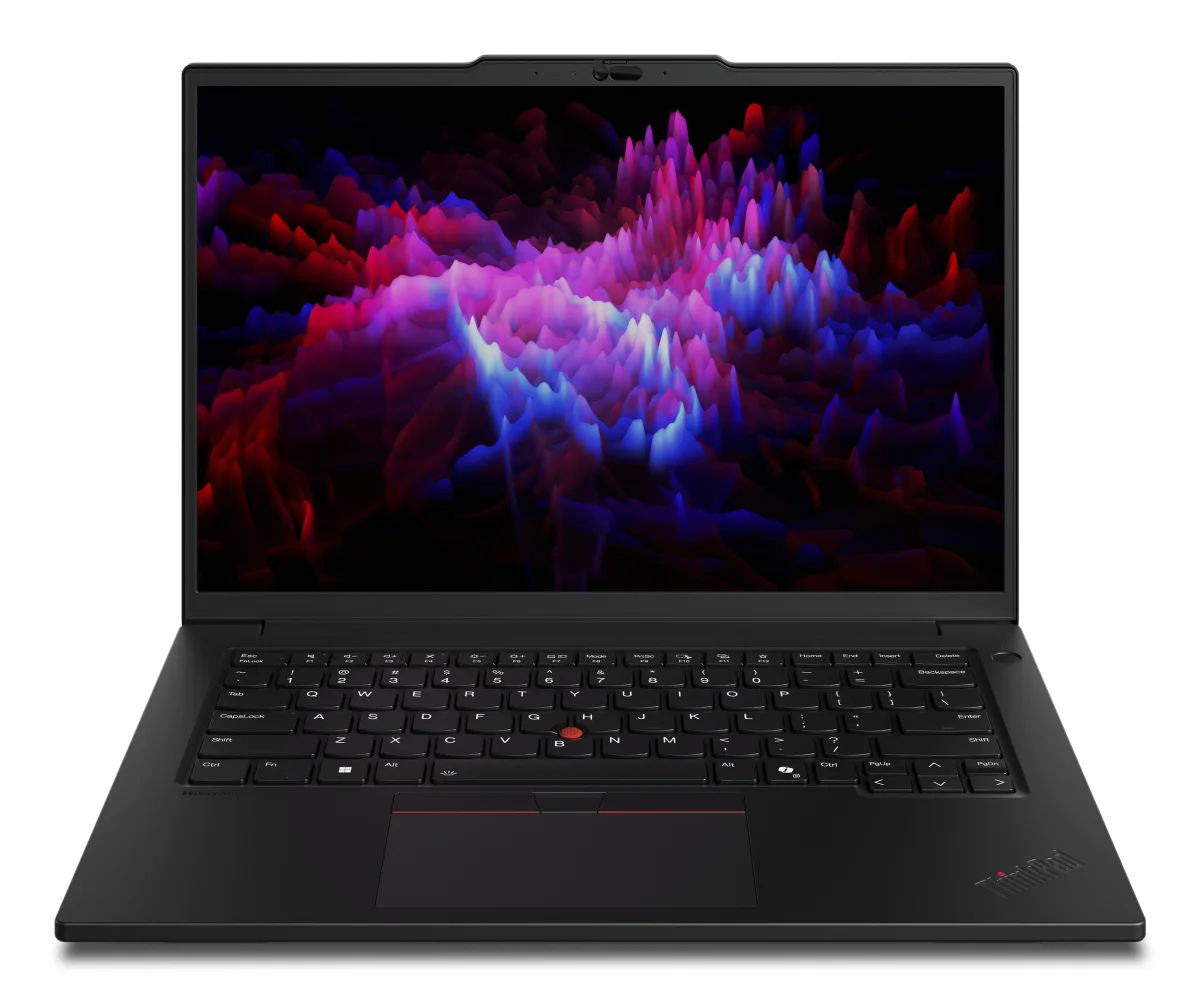
Lenovo ThinkPad P14s Gen 6 (Intel) is a 14.5-inch mobile workstation with an RTX PRO 500 Blackwell GPU, up to 96 GB DDR5 and a 75 Wh battery.
Editorial Verdict“A serviceable, port-rich 14.5-inch workstation whose screen and 100 W supply are weaker than the Gen 5's.”
Local LLM Capability (8k context · 4 GB OS reserve)
What fits in 96 GB on this chassis
Key Findings & Trade-offs
Two DDR5-5600 slots (up to 96 GB), one M.2 slot and Thunderbolt 4 on both USB-C ports make this a serviceable 14.5-inch workstation. Variants run 32–96 GB of RAM, 1 TB of storage, a Core Ultra 7 255H or 265H and an RTX PRO 500 Blackwell GPU.
Versus the Gen 5, the display is a step back: 1920 x 1200 at 60 Hz replaces 2560 x 1600 at 90 Hz, and the power adapter drops from 135 W to 100 W.
Two DDR5-5600 slots take up to 96 GB and the single M.2 slot accepts a PCIe 5.0 NVMe SSD, so you can start at 32 GB and 1 TB and expand later.
The 14.5-inch IPS panel is 1920 x 1200 at 60 Hz and 400 nits, non-touch. The Gen 5 had 2560 x 1600 at 90 Hz, so sharpness and smoothness both drop.
The adapter is 100 W, down from 135 W on the Gen 5, which leaves less headroom under combined CPU and GPU load. The 75 Wh battery is a sizeable reserve for this size.
Two Thunderbolt 4 ports, two USB-A, HDMI 2.1 and Ethernet cover most desk setups without adapters, at 1.64 kg.
- Engineers and designers who want a professional NVIDIA GPU in a 14.5-inch body with user-upgradeable RAM and storage.
- Dock users who need Thunderbolt 4 plus HDMI, USB-A and Ethernet on the machine itself.
- Buyers who plan to start at 32 GB and add memory later instead of paying for it upfront.
- You want a sharp or high-refresh panel, since the Gen 5's 2560 x 1600 at 90 Hz was a better screen.
- You need a touch screen, because this panel is non-touch.
- You want the lightest possible carry, as 1.64 kg is not the floor for a 14-inch-class machine.
Compatibility Notes
Verified Compatible Desk Gear
Matched on verified wattage & port specs


Where to Check Availability
Direct merchant link (no redirect). Editorial specs are never influenced by availability.Verified Technical Specifications
- Operating system
- Windows 11 Pro
- nvme
- Yes
- Wired Ethernet
- Yes
- M.2 SSD slots
- 1
- Memory type
- DDR5-SDRAM
- USB-C Power Delivery
- Yes
- Rated power supply
- 100 W
- Memory slots
- 2
- Weight
- 1.64 kg
- Battery
- 75 Wh
- HDMI ports
- 1
- Rated max memory
- 96 GB
- Panel
- IPS
- Refresh rate
- 60 Hz
- DisplayPort Alt Mode
- Yes
- USB-A ports
- 2
- USB-C ports
- 2
- HDMI version
- 2.1
- Touchscreen
- No
- Integrated NPU
- Yes
- Memory speed
- 5600 MT/s
- Storage interface
- PCI Express 5.0
- usb c charging
- Yes
- Display size
- 14.5″
- Resolution
- 1920 x 1200
- Thunderbolt ports
- 2
- Peak brightness
- 400 nits
- Thunderbolt version
- 4
Verified Configurations & Identifiers (60)
Frequently Asked Questions
Can I upgrade the RAM and SSD on the ThinkPad P14s Gen 6 (Intel)?
Yes. It has two DDR5-5600 memory slots supporting up to 96 GB and one M.2 slot for a PCIe 5.0 NVMe SSD.
Does the P14s Gen 6 (Intel) charge over USB-C?
Yes, USB-C charging and Power Delivery are supported. The supplied adapter is 100 W, down from 135 W on the Gen 5.
What ports and display outputs does it have?
Two Thunderbolt 4 USB-C ports with DisplayPort Alt Mode, two USB-A ports, one HDMI 2.1 port and Ethernet.