HP · 2024 · energystar_v9, open_icecat
HP EliteBook 1040 G11: 14" 2.8K OLED, Core Ultra 7, 32 GB
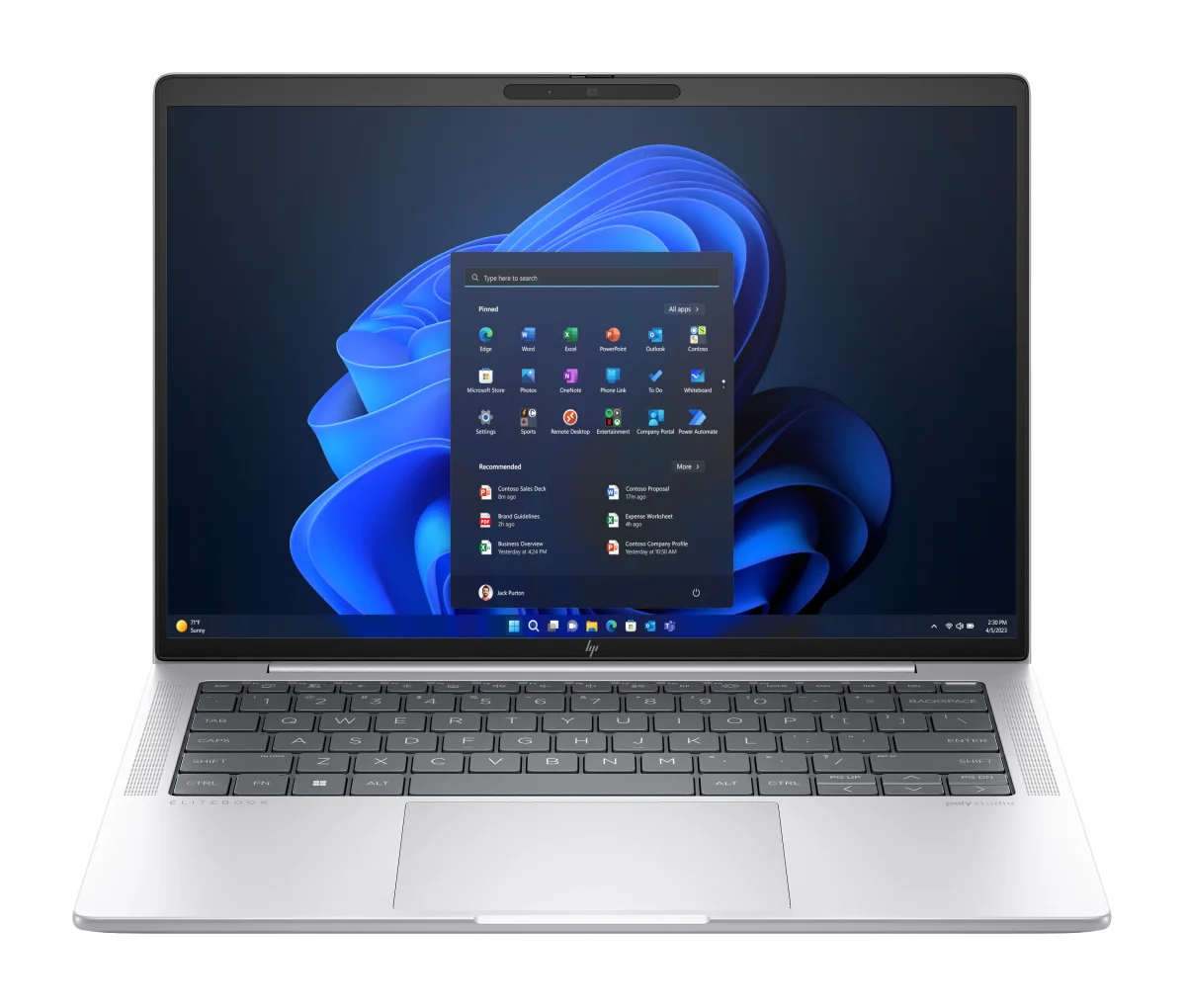
HP EliteBook 1040 G11 is a 1.18 kg 14-inch business laptop with a 2880 x 1800 OLED, Core Ultra 7 155H and 32 GB of soldered LPDDR5x RAM.
Editorial Verdict“A light OLED business laptop with fixed 32 GB RAM and one SSD slot, so the only upgrade is storage.”
Local LLM Capability (8k context · 4 GB OS reserve)
What fits in 32 GB on this chassis
Key Findings & Trade-offs
A 1.18 kg 14-inch laptop with a 2880 x 1800 OLED (400 nits, no touch) and a 68 Wh battery. The 32 GB of LPDDR5x-7500 is soldered, so there are no RAM slots and that capacity is fixed for the life of the machine. Storage is the one upgrade path: a single M.2 slot takes a PCIe 4.0 NVMe SSD, and configurations are 512 GB.
Three USB-C ports (two Thunderbolt 4), one USB-A and HDMI 2.1 cover most setups, but there is no Ethernet port.
14-inch 2880 x 1800 at up to 400 nits is sharp for documents and side-by-side windows, though 400 nits is modest in bright rooms and there is no touch.
1.18 kg with a 68 Wh battery makes it easy to carry every day.
32 GB of LPDDR5x at 7500 MT/s is fast, but with zero RAM slots it cannot be expanded later.
Two Thunderbolt 4 ports, a third USB-C, USB-A and HDMI 2.1, plus an NPU alongside the Core Ultra 7 155H for on-device AI features.
- Commuters and frequent travelers who want a 14-inch laptop at 1.18 kg
- Thunderbolt dock users who want a single-cable desk setup
- Buyers who value an OLED screen for documents and media and are happy with 32 GB of RAM
- You may need more than 32 GB of RAM, since it cannot be added
- You need built-in Ethernet or several USB-A ports
- You want a touchscreen or a display brighter than 400 nits
Compatibility Notes
Verified Compatible Desk Gear
Matched on verified wattage & port specs


Where to Check Availability
Direct merchant link (no redirect). Editorial specs are never influenced by availability.Verified Technical Specifications
- Operating system
- Windows 11
- nvme
- Yes
- Wired Ethernet
- No
- M.2 SSD slots
- 1
- Memory type
- LPDDR5x-SDRAM
- USB-C Power Delivery
- Yes
- Rated power supply
- 100 W
- Memory slots
- 0
- Weight
- 1.18 kg
- Battery
- 68 Wh
- HDMI ports
- 1
- Rated max memory
- 32 GB
- Panel
- OLED
- DisplayPort Alt Mode
- Yes
- USB-A ports
- 1
- USB-C ports
- 3
- HDMI version
- 2.1
- Touchscreen
- No
- Integrated NPU
- Yes
- Memory speed
- 7500 MT/s
- Storage interface
- PCI Express 4.0
- product family
- EliteBook
- product series
- 1000
- usb c charging
- Yes
- Display size
- 14″
- Resolution
- 2880 x 1800
- Thunderbolt ports
- 2
- Peak brightness
- 400 nits
- Thunderbolt version
- 4
Verified Configurations & Identifiers (36)
Frequently Asked Questions
Can I upgrade the RAM in the HP EliteBook 1040 G11?
No. The 32 GB of LPDDR5x-7500 is soldered and there are no RAM slots. Storage is different: one M.2 slot holds a PCIe 4.0 NVMe SSD.
Does the EliteBook 1040 G11 charge over USB-C?
Yes. USB-C charging is supported and the power supply is rated at 100 W. A lower-wattage charger will charge more slowly.
Can it connect to a Thunderbolt dock or external display?
Yes. Two of its three USB-C ports are Thunderbolt 4, USB-C supports DisplayPort Alt Mode, and there is an HDMI 2.1 port. It has no Ethernet port, so wired networking goes through a dock or adapter.