ASUS · 2026 · open_icecat
ASUS ProArt P14 H7407BA: 14" OLED, 128 GB RAM, 140 W USB-C
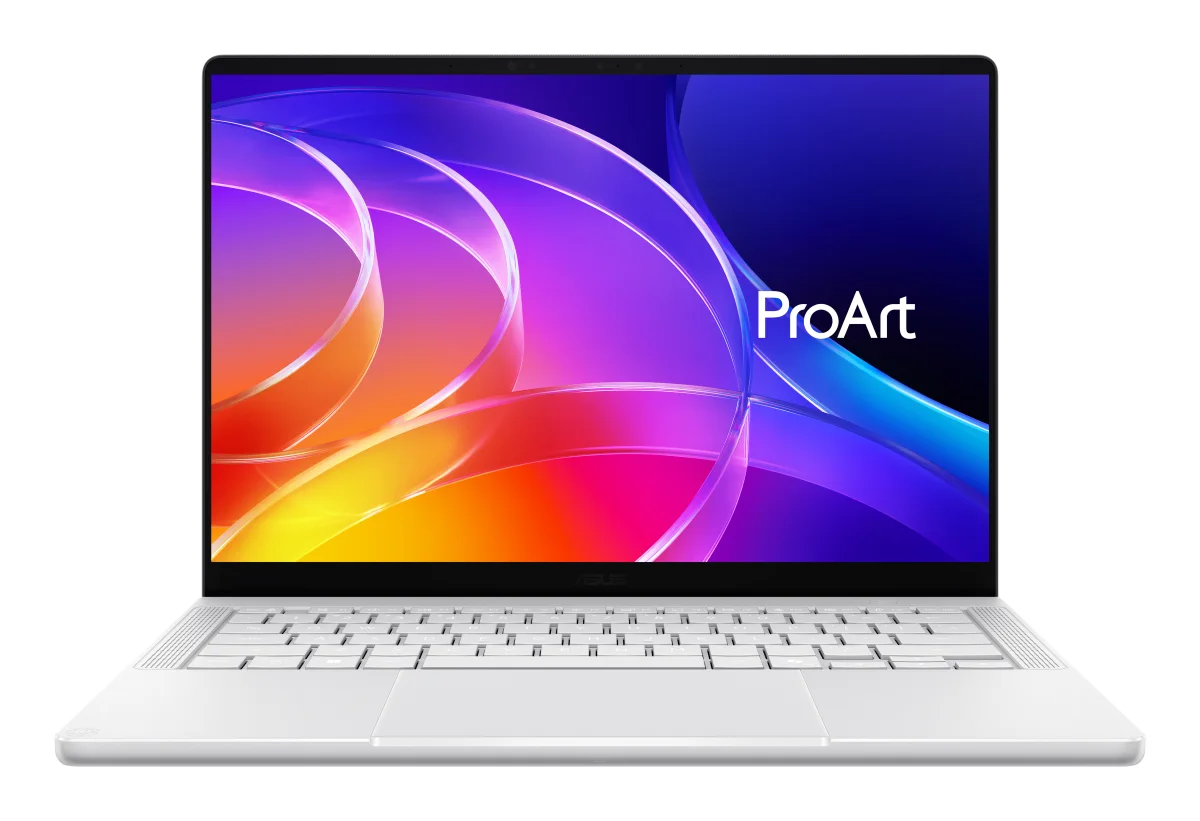
14-inch ASUS ProArt P14 (H7407BA) with a 2880 x 1800 120 Hz OLED, 128 GB soldered LPDDR5x, 1 TB SSD and USB-C charging up to 140 W.
Editorial Verdict“A 14-inch OLED laptop with 128 GB of soldered RAM: generous now, but you can never add more.”
Local LLM Capability (8k context · 4 GB OS reserve)
What fits in 128 GB on this chassis
Key Findings & Trade-offs
RAM and storage are the same across variants: NVIDIA RTX Spark N1X with Blackwell RTX graphics, 128 GB of LPDDR5x and 1 TB of SSD. The catch is that the memory is soldered with no slots, so 128 GB is what you keep for the life of the laptop.
The single M.2 slot (PCIe 4.0 NVMe) keeps storage replaceable. At 1.48 kg it is not featherweight, but it carries a 90 Wh battery, accepts USB-C charging from 45 to 140 W, and the power supply is rated 140 W.
14-inch 2880 x 1800 OLED at 120 Hz and up to 700 nits, sharp enough for photo and video work and smooth for everyday scrolling.
128 GB of LPDDR5x with zero slots gives plenty of headroom for large projects and local models, but it cannot be expanded later.
A 90 Wh battery plus USB-C PD from 45 to 140 W means a compatible USB-C charger can cover the same range as the 140 W supply.
Three USB-C, one USB-A and HDMI 2.1 cover most peripherals; there is no Ethernet port, so wired networking needs an adapter or dock.
- Photo and video editors who want a color-focused 14-inch OLED and a lot of memory.
- Developers and researchers running large datasets or local AI models that need plenty of RAM.
- Travelers who want to charge over USB-C and keep a single charger for desk and bag.
- You may want to add RAM later, because the 128 GB is fixed.
- You need a built-in Ethernet port and do not want to carry an adapter.
- You want a laptop lighter than 1.48 kg.
Compatibility Notes
Verified Compatible Desk Gear
Matched on verified wattage & port specs


Where to Check Availability
Direct merchant link (no redirect). Editorial specs are never influenced by availability.Verified Technical Specifications
- Operating system
- Windows 11 Pro
- nvme
- Yes
- Wired Ethernet
- No
- M.2 SSD slots
- 1
- Memory type
- LPDDR5x-SDRAM
- USB-C Power Delivery
- Yes
- Rated power supply
- 140 W
- Memory slots
- 0
- Weight
- 1.48 kg
- Battery
- 90 Wh
- HDMI ports
- 1
- Rated max memory
- 128 GB
- Panel
- OLED
- Refresh rate
- 120 Hz
- DisplayPort Alt Mode
- Yes
- USB-A ports
- 1
- USB-C ports
- 3
- HDMI version
- 2.1
- Storage interface
- PCI Express 4.0
- product family
- ProArt
- product series
- P14
- usb c charging
- Yes
- Max USB-C PD
- 140 W
- Min USB-C PD
- 45 W
- Display size
- 14″
- Resolution
- 2880 x 1800
- Peak brightness
- 700 nits
Verified Configurations & Identifiers (13)
Frequently Asked Questions
Can I upgrade the RAM in the ASUS ProArt P14 H7407BA?
No. The 128 GB of LPDDR5x is soldered and there are no RAM slots. Only storage can be changed, through the single M.2 slot.
Can the ProArt P14 charge over USB-C?
Yes. USB-C charging and Power Delivery are supported from 45 W to 140 W. The included class of power supply is rated 140 W.
How many external displays can I connect to the ProArt P14?
It has three USB-C ports with DisplayPort Alt Mode and one HDMI 2.1 port. The specifications do not state a maximum number of simultaneous monitors.